[TOC]
burp 插件开发 - python(三)
Refer: https://portswigger.net/burp/extender#SampleExtensions
Python 编写 Burp 面板
demo code:
#!/usr/bin/env python
#coding:utf-8
import sys
reload(sys)
sys.setdefaultencoding('utf-8')

# 导入 burp 接口
from burp import IBurpExtender, ITab

from javax.swing import JPanel
from javax.swing import JButton

class BurpExtender(IBurpExtender, ITab):

    def registerExtenderCallbacks(self, callbacks):

        self._cb = callbacks
        self._hp = callbacks.getHelpers()

        self._cb.setExtensionName('BurpPython')
        print 'hello burp!'

        self.mainPanel = JPanel()

        # 初始化一个 JButton 并绑定单击事件
        self.testBtn = JButton('Click Me!', actionPerformed=self.testBtn_onClick)

        self.mainPanel.add(self.testBtn)

        self._cb.customizeUiComponent(self.mainPanel)
        self._cb.addSuiteTab(self)

    def testBtn_onClick(self, event):
        print 'testBtn clicked!'

    # 实现 ITab 接口的 getTabCaption() 方法
    def getTabCaption(self):
        return 'BurpPython'

    def getUiComponent(self):
        return self.mainPanel
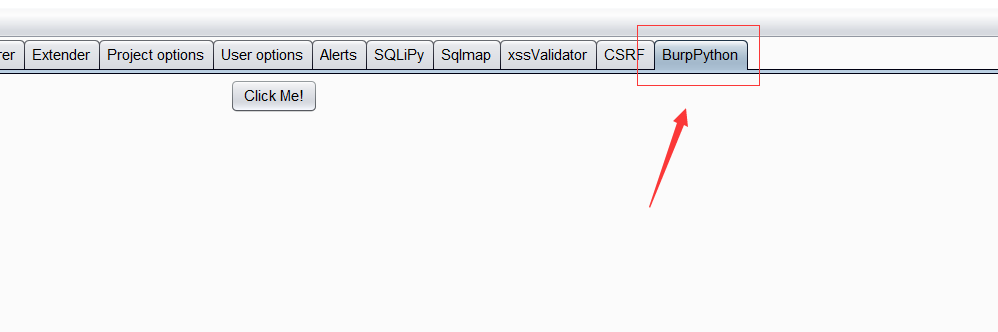
使用 Python 调用 Java 的 swing 图形控件库并绑定相关事件。最终结果如下图:
 image
image
Python 编写 Burp 插件实例之右键工具集成菜单
demo code:
#!/usr/bin/env python
#coding:utf-8
import sys
reload(sys)
sys.setdefaultencoding('utf-8')

import os
import sys
import json
import thread
import traceback

# 导入 burp 相关接口
from burp import IBurpExtender
from burp import IContextMenuFactory

# 导入 Java 相关库
from javax.swing import JMenu
from javax.swing import JMenuItem

reload(sys)
sys.setdefaultencoding('utf-8')


class BurpExtender(IBurpExtender, IContextMenuFactory):

    def registerExtenderCallbacks(self, callbacks):

        self.messages = []
        self.menusConf = {}

        self.callbacks = callbacks
        self.helpers = callbacks.getHelpers()

        self.callbacks.issueAlert('toolKits is ready ...')
        self.callbacks.setExtensionName('toolKits')
        self.callbacks.registerContextMenuFactory(self)

    def loadMenus(self):
        self.menus = []
        self.mainMenu = JMenu("toolKits")
        self.menus.append(self.mainMenu)

        try:
            with open('toolKits/toolKits.conf') as fp:
                self.menusConf = json.loads(fp.read())
        except:
            self.mainMenu.add(JMenuItem(u'加载配置出错!'))
        else:
            for tool in self.menusConf:
                # 遍历配置,创建子菜单项,并添加事件绑定
                menu = JMenuItem(tool['name'],
                                 None,
                                 actionPerformed=lambda x: self.eventHandler(x))
                self.mainMenu.add(menu)

    def createMenuItems(self, invocation):

        # 将加载的过程放在 createMenuItems 接口方法中
        # 可以在不重新加载该插件的情况下,动态加载配置
        self.loadMenus()

        self.messages = invocation.getSelectedMessages()

        # 只在指定的 Burp 标签的右键菜单显示
        # ctx = invocation.getInvocationContext()
        # if not ctx in [0, 1, 2, 3, 4, 5, 6]:
        #     return None

        return self.menus if self.menus else None

    def eventHandler(self, x):
        '''
            通过获取当前点击的子菜单的 text 属性,确定当前需要执行的 command
            启动线程执行命令
        '''

        try:
            menuName = x.getSource().text
            for tool in self.menusConf:
                if tool['name'] == menuName:
                    commands = [tool['command'].replace(
                        '{#}', val) for val in self.getValue(tool['param'])]
                    [thread.start_new_thread(self.execCommand, (command,))
                     for command in commands]
        except:
            print traceback.print_exc()

    def getHost(self, message):
        return message.getHttpService().getHost()

    # 获取 Url 注意此处若通过 meesage.getRequest() 是获取不到的
    def getUrl(self, meesage):
        return str(self.helpers.analyzeRequest(meesage).getUrl())

    # 通过配置中的 参数值 分别获取不同值
    def getValue(self, paramType):
        if paramType == 'host':
            return set([self.getHost(message) for message in self.messages])
        elif paramType == 'url':
            return set([self.getUrl(message) for message in self.messages])

    # 执行命令处理方法
    def execCommand(self, command):
        try:
            print '[I] 正在执行命令: {command}, 请稍后...'.format(command=command)
            res = '---------- 命令 {command} 执行结果: ---------- {res}'.format(
                command=command, res=os.popen(command).read())
            print res
        except:
            print traceback.print_exc()
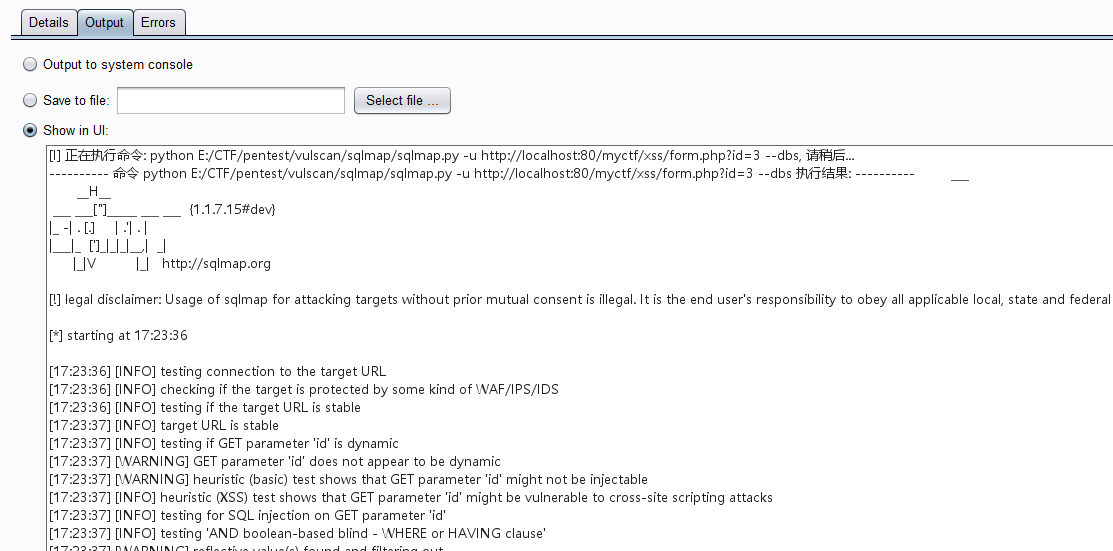
配置文件:
[{
  "name": "Nmap 扫描端口",
  "param": "host",
  "command": "nmap -T4 {#}"
},
{
  "name": "SQLMap 检查注入",
  "param": "url",
  "command": "python E:/CTF/pentest/vulscan/sqlmap/sqlmap.py -u {#} --dbs"
}]
 image
image
 image
image
python 开发unicode 解码操作(http响应包处理)
Referer: http://www.vuln.cn/6097
#!/usr/bin/env python
#coding=utf8
from burp import IBurpExtender
from burp import IHttpListener
from burp import IHttpRequestResponse
from burp import IResponseInfo

import re
# Class BurpExtender (Required) contaning all functions used to interact with Burp Suite API

print 'stayliv3.github.io'

class BurpExtender(IBurpExtender, IHttpListener):

    # define registerExtenderCallbacks: From IBurpExtender Interface
    def registerExtenderCallbacks(self, callbacks):

        # keep a reference to our callbacks object (Burp Extensibility Feature)
        self._callbacks = callbacks
        # obtain an extension helpers object (Burp Extensibility Feature)
        # http://portswigger.net/burp/extender/api/burp/IExtensionHelpers.html
        self._helpers = callbacks.getHelpers()
        # set our extension name that will display in Extender Tab
        self._callbacks.setExtensionName("unicode decode")
        # register ourselves as an HTTP listener
        callbacks.registerHttpListener(self)

    # define processHttpMessage: From IHttpListener Interface
    def processHttpMessage(self, toolFlag, messageIsRequest, messageInfo):

        # determine what tool we would like to pass though our extension:
        if toolFlag == 64 or toolFlag == 16 or toolFlag == 32: #if tool is Proxy Tab or repeater
            # determine if request or response:
            if not messageIsRequest:#only handle responses
                response = messageInfo.getResponse()
                 #get Response from IHttpRequestResponse instance
                analyzedResponse = self._helpers.analyzeResponse(response) # returns IResponseInfo
                headers = analyzedResponse.getHeaders()
                #替换iso8859-1
                # iterate though list of headers
                new_headers = []
                for header in headers:
                    # Look for Content-Type Header)
                    if header.startswith("Content-Type:"):
                        # Look for HTML response
                        # header.replace('iso-8859-1', 'utf-8')
                        # print header
                        new_headers.append(header.replace('iso-8859-1', 'utf-8'))
                    else:
                        new_headers.append(header)

                print new_headers

                body = response[analyzedResponse.getBodyOffset():]
                body_string = body.tostring()
                print body_string
                u_char_escape = re.search( r'(?:\\u[\d\w]{4})+', body_string)
                if u_char_escape:
                    # print u_char_escape.group()
                    u_char = u_char_escape.group().decode('unicode_escape').encode('utf8')
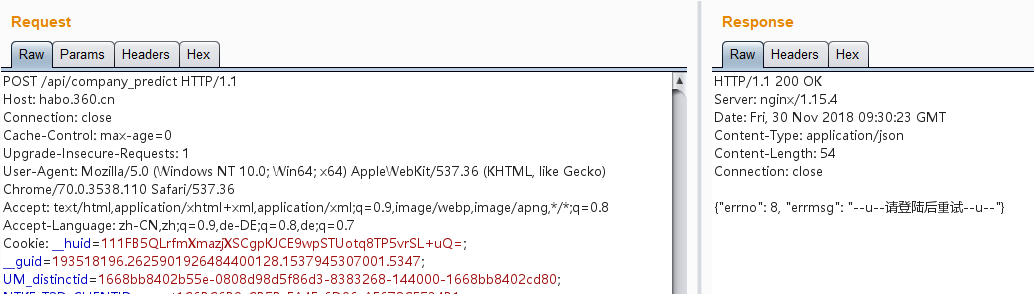
                    new_body_string = body_string.replace(u_char_escape.group(),'--u--'+u_char+'--u--')
                    new_body = self._helpers.bytesToString(new_body_string)
                    # print new_body_string
                    messageInfo.setResponse(self._helpers.buildHttpMessage(new_headers, new_body))
 image
image
程序中对IHttpRequestResponse 调用了self._helpers来解析,为什么需要解析呢? 我们可以看一下输出
 image
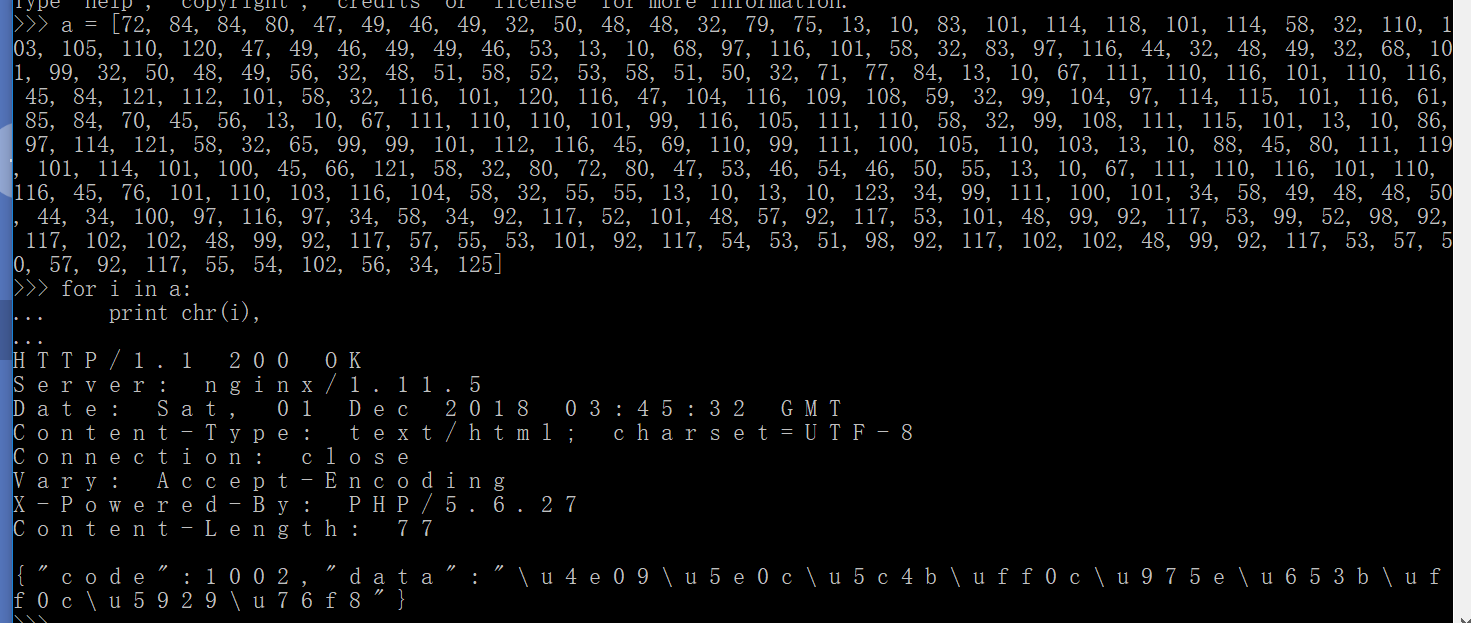
IHttpRequestResponse.getResponse()函数获取到的是ascii码,我们可以看看内容:
image
IHttpRequestResponse.getResponse()函数获取到的是ascii码,我们可以看看内容:
 image
可以看到,就是响应的ascii。
image
可以看到,就是响应的ascii。
self._helpers()函数可以将字节码解析成IResponseInfo对象来调用。
而IResponse对象的方法有:
int	getBodyOffset() //This method is used to obtain the offset within the response where the message body begins.
java.util.List<ICookie>	getCookies() //This method is used to obtain details of the HTTP cookies set in the response.
java.util.List<java.lang.String>	getHeaders() //This method is used to obtain the HTTP headers contained in the response.
java.lang.String	getInferredMimeType() //This method is used to obtain the MIME type of the response, as inferred from the contents of the HTTP message body.
java.lang.String	getStatedMimeType() //This method is used to obtain the MIME type of the response, as stated in the HTTP headers.
short	getStatusCode() //This method is used to obtain the HTTP status code contained in the response.
我们看到IResponseInfo对象并没有直接获取getBody()的函数,而是一个getBodyOffset()来获取body偏移的函数。
 image
image
那么如果获取response body的内容呢?
body = response[analyzedResponse.getBodyOffset():]
print 'body:',body.tostring()
可以通过这两行程序来获取
 image
image
获取到了body的值后对body的内容进行解码处理,然后需要重新构建新的body.
//Interface IHttpRequestResponse
void setResponse(byte[] message)
//Interface IExtensionHelpers
byte[]	buildHttpMessage(java.util.List<java.lang.String> headers, byte[] body)
This method builds an HTTP message containing the specified headers and message body.
我们看到重新构建新得body的时候,用了两个函数,一个是setResponse(), 这个函数接受的是一个byte[] 类型的数据,因此我们需要先用buildHttpMessage()函数将headers和body转换成byte[]类型的数据。
python: 签名插件(http请求包修改)
from burp import IBurpExtender
from burp import IHttpListener
from java.io import PrintWriter
import hashlib
import urllib

print "Hack Jeecms Sign By Nerd."

class BurpExtender(IBurpExtender, IHttpListener):
    def registerExtenderCallbacks(self, callbacks):

        self._callbacks = callbacks
        self._helpers = callbacks.getHelpers()
        callbacks.setExtensionName("Hack JeeCMS Sign")
        callbacks.registerHttpListener(self)
        self.stdout = PrintWriter(callbacks.getStdout(), True)
        self.stderr = PrintWriter(callbacks.getStderr(), True)
        callbacks.issueAlert("Loaded Successfull.")

    def processHttpMessage(self, toolFlag, messageIsRequest, currentRequest):
        if messageIsRequest:

            requestInfo = self._helpers.analyzeRequest(currentRequest)

            self.headers = list(requestInfo.getHeaders())
            hook_host = requestInfo.getUrl().getHost()

            bodyBytes = currentRequest.getRequest()[requestInfo.getBodyOffset():]
            self.body = self._helpers.bytesToString(bodyBytes)

            o,n = self.update_sign(urllib.unquote(self.body))
            self.body = self.body.replace(o,n)
            newMessage = self._helpers.buildHttpMessage(self.headers, self.body)
            currentRequest.setRequest(newMessage)

        # Process responses
        else:
            pass

    def update_sign(slef, body=""):
        try:
            old_sign = ""
            # defalut appKey
            appKey = "uicxsXYso7DJxlrFdgQnVVXW5OCzU74h"

            hash_param = ""
            param_list = body.split("&")

            temp_dict = {}
            for pa in param_list:
                t = pa.split("=")
                temp_dict[t[0]] = t[1]

            tmmmm = temp_dict.items()

            tmmmm.sort()
            for (k, v) in tmmmm:
                if k == "sign":
                    old_sign = v
                    print "old sign = ",v
                    continue
                hash_param += "%s=%s&" % (k, v)

            hash_param += "key=" + appKey
            sign = hashlib.md5(hash_param).hexdigest()
            return old_sign,sign.upper()
        except Exception, e:
            return "",""
http 请求参数修改有两种方式,一种是和处理http响应一样,直接replace 掉body的内容,第二种是使用getParamter()函数来获取参数替换。 demo :
    def processHttpMessage(self, toolFlag, messageIsRequest, currentRequest):
        if toolFlag == 64 or toolFlag == 16 or toolFlag == 32: #if tool is Proxy Tab or repeater
            if messageIsRequest:
                requestInfo = self._helpers.analyzeRequest(currentRequest)
                self.headers = list(requestInfo.getHeaders())
                #print 'headers:',self.headers


                bodyBytes = currentRequest.getRequest()[requestInfo.getBodyOffset():]
                self.body = self._helpers.bytesToString(bodyBytes)
                #print 'self.body:',self.body
                o,n = self.update_sign(urllib.unquote(self.body))
                self.body = self.body.replace(o,n)
                #print 'replace self.body',self.body
                paraList = self._helpers.analyzeRequest(currentRequest).getParameters()
                #print 'para list',paraList
                newPara = self._helpers.buildParameter('id','xxx', 1);  # 使用parameter 来修改参数
                newMessage = self._helpers.buildHttpMessage(self.headers, self.body) #直接替换body的参数内容。
                newMessage = self._helpers.updateParameter(newMessage, newPara)
                #print 'newMessage:',newMessage
                currentRequest.setRequest(newMessage)
            # Process responses
            else:
                pass

    def update_sign(self, body=""):
        try:
            o = self.body
            n = 'id=1<img>&x=1<img>&d=1<img>'
            return o,n
        except Exception, e:
            return "",""
一下两行便是对param进行处理的代码
newPara = self._helpers.buildParameter('id','xxx', 1);
newMessage = self._helpers.updateParameter(newMessage, newPara)
buildParamter的用法是:buildParameter(java.lang.String name, java.lang.String value, byte type)
type指参数类型,参数共有7种格式,0是URL参数,1是body参数,2是cookie参数,6是json格式参数。
总结:
processHttpMessage 和 动态更新Request 的区别
processHttpMessage() 函数是在发起请求的一刻去监听,然后执行这个函数去构造真正的request请求,可以在repeater或者intruder窗口去监听。在请求发起的那一刻去构造真正的request请求数据包,因此我们在Repeater中是不会看到我们修改的请求包。
但如果我们修改的是响应包,则是可以看得到的。
动态更新Request即当我们点击右键的时候,可以看到repeater窗口,或者intruder窗口的变化。
参数获取的方法
//**************获取参数 通过IRequestInfo对象*************************//
List<IParameter> paraList = analyzeRequest.getParameters();
//当body是json格式的时候,这个方法也可以正常获取到键值对;
//但是PARAM_JSON等格式不能通过updateParameter方法来更新。
//如果在url中的参数的值是 xxx=json格式的字符串 这种形式的时候,getParameters应该是无法获取到最底层的键值对的。
for (IParameter para : paraList){
    byte type= para.getType(); //获取参数的类型
    String key = para.getName(); //获取参数的名称
    String value = para.getValue(); //获取参数的值
}
//参数共有7种格式,0是URL参数,1是body参数,2是cookie参数,6是json格式参数
demo code:(python)
paraList = self._helpers.analyzeRequest(currentRequest).getParameters()
print 'paraList',paraList
for para in paraList:
    type = para.getType()
    key = para.getName()
    value = para.getValue()
    print type,key,value

>>>
paraList [burp.t0b@6beec43d, burp.t0b@49770a69, burp.t0b@56226f89, burp.t0b@39b1f93c, burp.t0b@24e30d1b, burp.t0b@55b66fac, burp.t0b@10ad1cb4, burp.t0b@26e37f84, burp.t0b@1a542596, burp.t0b@7c79e27f, burp.t0b@44909f8, burp.t0b@396b59aa, burp.t0b@2a8a384, burp.t0b@31f1d3b4, burp.t0b@7d3b1abb, burp.t0b@1e7eaabf, burp.t0b@598d9e77, burp.t0b@665e8a81, burp.t0b@4395ba33, burp.t0b@2855dbac]
0 id 1
2 0IGC_2132_lastcheckfeed 1%7C1540987028
2 0IGC_2132_nofavfid 1
2 1WmJ_2132_lastcheckfeed 1%7C1541126275
2 9RwT_2132_saltkey sxbfvmxz
2 9RwT_2132_lastvisit 1541467212
2 9RwT_2132_ulastactivity c850CXC2ILCbuEXGs4ysi8s7dnD8sIgXjQrPPQOXNDxoV0autQ5U
2 9RwT_2132_lastcheckfeed 2%7C1541470847
2 1WmJ_2132_ulastactivity 137bU68EZspYGHPoRx03Q%2BIF%2FPWaU3JZ5DdjOw2vJ4Q27F1ZAlLw
2 0IGC_2132_ulastactivity 39dfo6%2Fhn6JWGYz9FWKY%2BWEK15KD9QmM77bKIqK4ExdBwqXUgsbi
2 9RwT_2132_nofavfid 1
2 province_id 1
2 city_id 2
2 district_id 3
2 pgv_pvi 8970343424
2 _identity-frontend ca858ba5ec1b2e6ecba9329e0e51856b8dfdfa7fc8a6c479dd8fd5562777d20ea%3A2%3A%7Bi%3A0%3Bs%3A18%3A%22_identity-frontend%22%3Bi%3A1%3Bs%3A46%3A%22%5B1%2C%22G-z9APCNR7JOzMzRFTUYA-TdRnzrDnRv%22%2C2592000%5D%22%3B%7D
2 _identity-backend 3742ab05863bdfa90e1def484200ef8bdfd991abecf217f18db54e6f6f780e2ca%3A2%3A%7Bi%3A0%3Bs%3A17%3A%22_identity-backend%22%3Bi%3A1%3Bs%3A46%3A%22%5B1%2C%22G-z9APCNR7JOzMzRFTUYA-TdRnzrDnRv%22%2C2592000%5D%22%3B%7D
2 XDEBUG_SESSION XDEBUG_ECLIPSE
1 x 1x'"><rivirtest>
1 d 1x'"><rivirtest>
参数更新的方法
updateParameter(byte[] request, IParameter parameter)
This method updates the value of a parameter within an HTTP request, and if appropriate updates the Content-Length header.
    def getFuzz(self,x):
        if x.getSource().text.startswith('get fuzz'):
            self.payload = x.getSource().text.split(':')[-1]
            currentRequest = self.invocation.getSelectedMessages()[0] #return IHttpRequestResponse
            body = currentRequest.getRequest() #return byte[]
            requestInfo = self._helpers.analyzeRequest(currentRequest) #returns IResponseInfo
            paraList = requestInfo.getParameters() #array
           # print 'paraList',paraList
            new_requestInfo = body
            for para in paraList:
                if para.getType() == 0:
                    value = para.getValue()+self.payload
                    key = para.getName()
                    newPara = self._helpers.buildParameter(key, value, para.getType())
                    new_requestInfo = self._helpers.updateParameter(new_requestInfo,newPara) #updateParameter(byte[],IParameter) return byte[]


            currentRequest.setRequest(new_requestInfo)
里面涉及了几种数据类型的转换,因此一定要注意了。
获取headers和body的方法如下:
//**************获取headers 通过IRequestInfo对象*************************//
List<String> headers = analyzeRequest.getHeaders();


//**************获取body 通过String格式的request截取*************************//
int bodyOffset = analyzeRequest.getBodyOffset();

byte[] byte_Request = messageInfo.getRequest();//当需要byte[]和string格式的请求包时用这个方法!
String request = new String(byte_Request); //byte[] to String

String body = request.substring(bodyOffset);
byte[] byte_body = body.getBytes();  //String to byte[]
updateParamter()函数如果key存在,则更新,如果key不存在,则新增。
Referer: burp suite API 处理http请求和响应的基本流程 https://github.com/bit4woo/burp-api-drops
python 编写主动/被动扫描插件
carbonator
file_name = 'burp_report_'+self.scheme+'_'+self.fqdn+'_'+str(self.port)+'.'+time.strftime("%Y%m%d-%H%M%S",time.localtime(time.time()))+format.lower()
用Python开发一个扫描目录的主动扫描插件
一些burpsuite 的py插件收集
Referer: https://github.com/PortSwigger (burpsuite官网插件库)
burp-xss-sql-plugin
HTML Inj: Special symbols are checked one-by-one if they appear in output. WAF/base64encoding/location/content-type/etc detections.
SQL Inj: All parameters are transfered through SQLMap API to host, which in used for asynchronous scanning.
class BurpExtender(IBurpExtender, IScannerCheck, IHttpListener, IProxyListener, IScannerListener, IExtensionStateListener):
off-by-slash
Burp扩展通过NGINX大规模错误配置来检测别名遍历
https://github.com/bayotop/off-by-slash
The extension implements an active scanner check. Simply run a new scan, preferably with an “Audit checks - extensions only” configuration, on static resources identified via Burp’s crawler. Alternatively, use scrape.py with a list of URLs to scrape static resources from. The results can be directly passed to a new Burp scan (Burp 2.0).
CTFHelper
simple Burp extension for scanning stuffs in CTF
https://github.com/unamer/CTFHelper
This extension will scan some sensitive files (backup files likes .index.php.swp or .git directory) in web server that makes solving CTF challenge faster.
off-by-slash(nginx alias traversal)
Burp extension to detect alias traversal via NGINX misconfiguration at scale. Requires Burp Professional.
https://github.com/PortSwigger/nginx-alias-traversal
chunked-coding-converter
https://github.com/c0ny1/chunked-coding-converter
本插件主要用于分块传输绕WAF,不了解分块传输绕WAF的请阅读文末的文章。